

Agentforce 360 Deep Dive: Agent Script for Consistent Execution
In this Agentforce 360 deep dive, we examine how Agentforce Script helps close the agentic divide by turning agent interactions into consistent, operational workflows.
Welcome back! You have now reached the part in our Agentforce series where we talk about Agent Script. Specifically, how to make a “helpful” agent into a reliable one, and bring your organization one step closer to being an agentic enterprise.
So far, we’ve been breaking down some of the core capabilities of Agentforce 360 that bridge the agentic divide. We already reviewed Agentforce Builder, so let’s look at one of its best attributes, Script!
Agent Script is generally available now. Salesforce designed it around the reality that Large Language Models (LLMs) work great, but guiding them with natural language alone does not set up the guardrails needed to ensure structured business logic for predictable and reliable agent behavior.
In the real world, inconsistency kills trust. If two customers ask the same thing and get two different outcomes, people stop trusting the agent and internal teams stop scaling it. This is especially dangerous in a Pilot phase and could kill optimism.
Think of it this way: Builder helps you create agents. Script helps you standardize how they behave, so the experience feels consistent for customers and reliable for the teams running the process behind the scenes.
Let’s take a quick look at how this is done, why we’re excited about it at Smartbridge, and an example of how it can be used at an energy company.
What Agentforce Script is (plain English)
Script simplifies agent instructions for developers and admins, creating an agent that behaves more predictably and operates more reliably.
Before, teams wrote instructions in natural language as prompts and guidance. Now, with Script, a human-readable expression language adds deterministic controls. It shifts the model from “the agent will try its best” to “the agent will follow the right steps.”
Instead of relying on guidance alone, the agent now has a playbook—standard operating procedures, if you will. Script defines the sequence: what to ask, what to confirm, what to do, and when to escalate.
Agentforce Builder is the part of the Agentforce 360 platform that helps teams design and configure agents inside Salesforce—where data, workflows, and permissions already exist.
Instead of treating agents like external tools, Builder treats them like part of the operating model. Teams can shape what an agent should do, what it can access, and how it behaves inside real business processes.
That shift matters because it pulls agent development closer to the source of truth. It also makes constraints visible early—before agents start making decisions based on incomplete context.
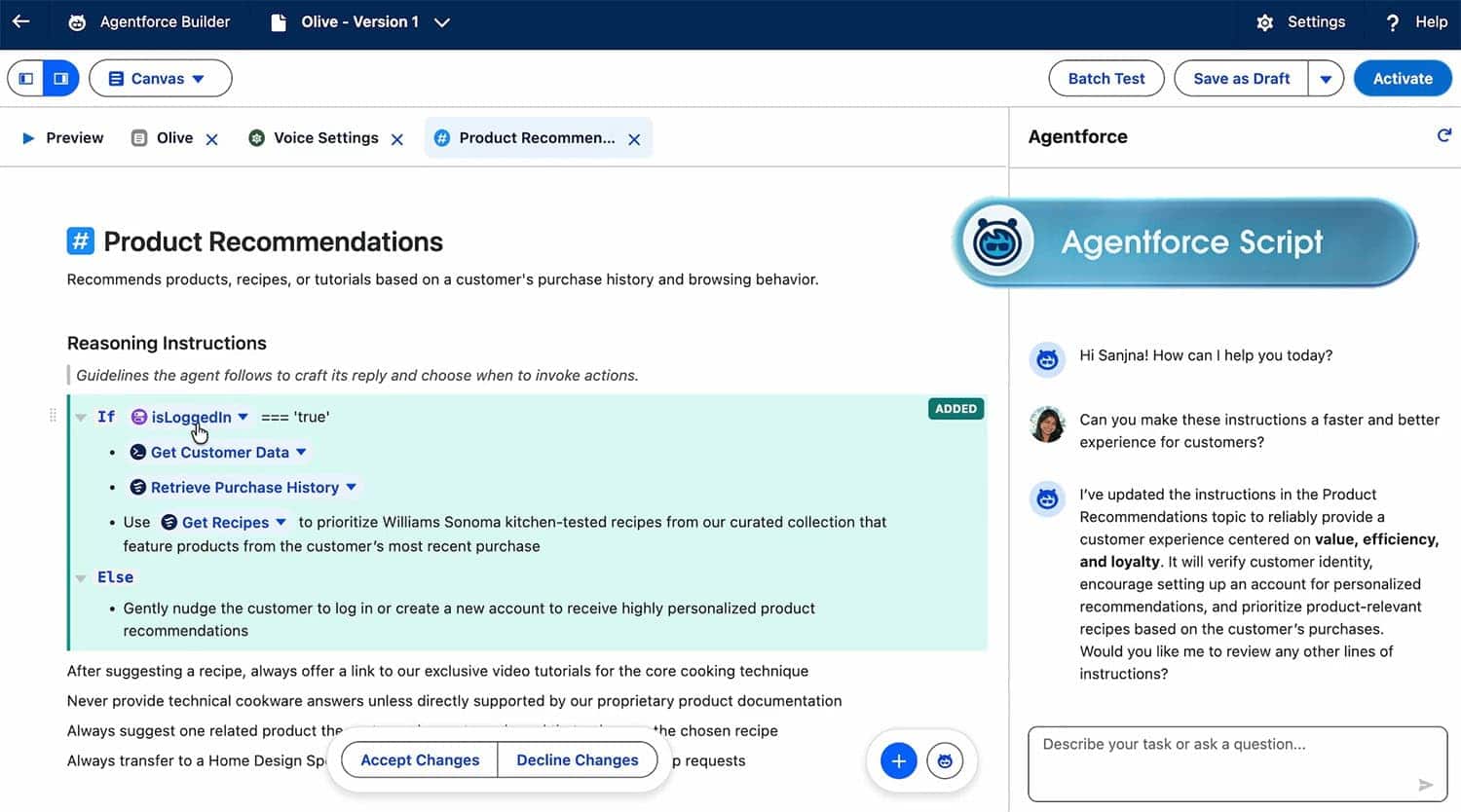
Agent Script in action, now in GA
Why Smartbridge is excited about Agent Script
Sometimes it’s hard to see failure points in a new technology until you experience them in production. You don’t know what you don’t know. Script may be one of the most critical capabilities behind the Agentforce 360 platform because it addresses a key failure point in agentic AI: inconsistency.
If you’ve ever asked ChatGPT to stop using the em dash in your prompts over and over again, you already understand the problem. It only maybe sort of listened.
Agentforce Script brings the benefits of structured logic (without requiring you to be a developer or write code) so your agent follows the right steps in the right order every time. That creates a response, process, and outcome that’s repeatable, testable, and easier to trust at scale.
That’s why Script matters so much in industries like energy, where work depends on consistent execution. Especially when SLAs, billing, compliance, and customer trust are on the line. Let’s walk through a practical example of how an energy company could use Agentforce Script to drive more predictable outcomes.

Consulting Partner

Managed Services Provider
Agentforce 360 Use Case
Putting it in Practice – A use case for an Energy Field Service Work Order Triage
An energy company can use Agentforce Script to standardize field service work order intake and triage. When a request comes in, the agent follows the same steps every time: confirm the asset and location, capture the issue type and urgency, ask a few diagnostic questions, and create the work order with the right priority and routing.
If key details are missing, or the request crosses a safety or SLA threshold, Script triggers escalation automatically. That consistency reduces rework for dispatch, speeds up scheduling, and keeps field teams focused on execution instead of clarification.

What Comes Next
Agentforce Script helps teams move from “the agent gave a decent answer” to “the agent followed the right process.” When you standardize steps, required inputs, and escalation paths, you get an agent your teams can actually trust in production—not just in a demo. And that’s the difference between experimenting with agents and running them like part of the business. We’re excited to see how Salesforce continues evolving Script, because the more consistent and testable agent behavior becomes, the easier it is for enterprises to scale with confidence.
Next up, we’ll dive into Agentforce Intelligent Context and why even the best script still falls apart if the agent can’t see the full picture.