

Microsoft Agent 365 is Turning AI Agent Chaos into a Manageable System
Microsoft introduced Agent 365, a control plane for managing AI agents across your organization. We’ll break down what it is, why it matters, and how it can help you finally see, govern, and rationalize all the agents already operating in your environment.
AI agents moved from experiments to everyday tools in a very short time. You probably already have agents helping with sales outreach, ticket triage, document drafting, and workflow automation across your business. The problem is that many organizations cannot answer some basic questions like:
Microsoft’s new Microsoft Agent 365 is their answer to that problem. It treats agents more like digital coworkers you manage alongside people, not side projects scattered across tools.
IDC expects there will be about 1.3 billion AI agents in use by 2028, which gives you a sense of how quickly this category is growing. (Microsoft)
If you feel like agent use in your company is already getting messy, you are not alone.

What is Microsoft Agent 365, in practical terms?
Microsoft describes Agent 365 as “the control plane for AI agents.” In basic terms, it is a management and governance layer that sits on top of all your agents and connects them into your existing Microsoft 365 environment. For an even more in-depth view of Agent 365, continue reading our newest article, What is Microsoft Agent 365?
A few key points from Microsoft about the new tool:
With Microsoft Agent 365, you’re getting an operational layer that aims to make agents manageable at scale. For many businesses, this is what they’ve been missing.
Why AI agents have become an inventory problem
Most organizations started with one or two obvious agent use cases. For example:
Then business units, vendors, and individual power users started building their own agents. Some live inside Teams, others come from SaaS tools that quietly added an “agent” feature, and a few are pilot projects that never officially went through IT.
Now you have:
This is the mess Microsoft is trying to clean up with Agent 365. One of the most interesting aspects of this new platform is discovery. The Entra-powered registry can surface agents across your environment, including ones that were never part of a central rollout. Microsoft has even called out that the registry will eventually detect shadow agents as well.
In other words, Agent 365 can help you uncover agents you did not even know you had, then give you tools to decide what stays, what changes, and what gets retired.
The five core capabilities, explained with business impact
Microsoft frames Agent 365 around five main capabilities. Here’s what they are and what they mean for you in practice.
1. Registry
Your Agent System of Record
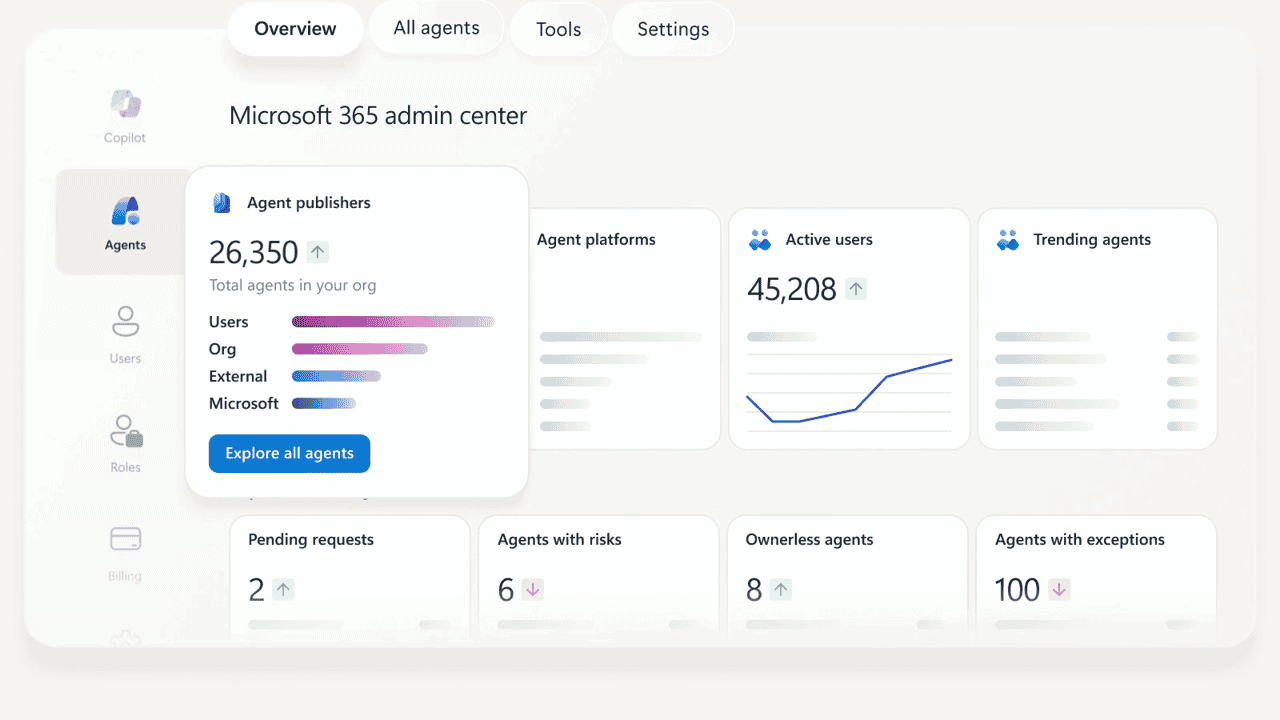
The registry is a central inventory of every agent in your tenant. It tracks:
IT can quarantine unsanctioned agents or hide them from users, and the Agent Store gives users a curated place to discover approved agents inside Microsoft 365 Copilot and Teams.
From a business perspective, this is where you can start cleaning up agent sprawl. Once you can see everything, you can rationalize combining similar agents, decommissioning low-value experiments, and standardizing on a smaller set of “tier one” agents.
2. Access control
Treating Agents Like Their Own Identities
Every agent gets a unique agent ID via Microsoft Entra which means you can apply access policies to agents in a similar way as you do to people. You can:
If your concern today is “these agents feel like black boxes hitting sensitive data,” this capability should be on your radar.
3. Visualization
Actually Seeing How Agents Interact With Your Business
Agent 365 ships with telemetry, dashboards, and relationship maps that show which users and systems an agent interacts with, how often it runs and for which tasks, and how it performs on speed and quality metrics.
You also get role-based reporting so different stakeholders see the views that matter to them.
This is where you get out of “trust me, this agent is helpful” and into measurable impact like:
Visualization also plays a governance role in a way. It helps you spot risky connections or unexpected data flows before they turn into incidents.
4. Interoperability
Connecting Agents to Real Work
Agents need context to be useful which is why Agent 365 connects agents to:
This is the difference between a demo and a production system. Agents that understand your work context and can operate inside your core apps are far more likely to deliver sustained value.
5. Security
Bringing Agents into Your Existing Defense Model
Security teams do not want a separate, parallel world for agents. They want to be able to monitor and management agents from the places they are already working in. That’s why it’s important Agent 365 also integrates with:
Alignment is the key benefit here. You can bring agents into your existing enterprise security posture instead of stitching together one-off controls around each project.
What this means for business and IT leaders
Stepping back from the feature list, what does Agent 365 actually change for a business like yours?
Agents become a first-class operational concern
With a control plane in place, you can stop treating agents as “experiments” and start treating them as part of your operating model. This means having a clear idea on who owns each agent, lifecycle management, and inclusion in budgets, KPIs, and risk reviews.
Ask yourself: If an agent fails tomorrow, do you know who gets paged, who approves a fix, and how you track the impact on customers or employees? Agent 365 makes it easier to formalize those answers.
You can clean up and simplify an overgrown agent portfolio
Today, many organizations are in “AI experimentation debt.” Every project added a bit of value at the time, but taken together they created a messy environment.
Agent 365 gives IT and business teams the data to simplify. For example:
Over the next few years, I expect many companies to reduce their number of agents while increasing the impact of the ones they keep.
Governance and compliance get ahead of the problem
Regulators are catching up with AI and so are internal risk and audit teams. Detailed logging, e-discovery, and policy enforcement for agents will matter more with each passing year.
Agent 365 doesn’t necessarily make governance “easy-peasy” per se, but it does give you a framework that lines up with how you already manage users, apps, and data. That alone can save a lot of energy across legal, compliance, and security.
You can move faster without losing control
When IT has visibility, control, and clear guardrails, it becomes much easier to say “yes” to new agent use cases.
Instead of blocking projects out of caution, you can provide approved build paths, offer standardized policies and templates, and easily monitor performance and risk right from the start.
That is how you get real digital enablement instead of sporadic AI wins.
A few opinions on where this is heading
Here are a few personal takes based on what Microsoft has announced and what I see in the field.
The bigger shift is overall a cultural shift. Moving from “anyone can spin up an agent and hope for the best” to “agents are managed, measured, and accountable” will require new habits across the business.
How you might get started
At the moment, Microsoft is offering Agent 365 through its Frontier early access program, with entry points in the Microsoft 365 admin center for IT admins.
The technology itself is only one part of the story. The real value will come from how you use tools like Agent 365 to bring order, accountability, and measurable outcomes to your AI agent strategy. You can get started and prepare for Agent 365 by assessing your current known agents, data sources, and governance strategies. Smartbridge is always here to help along your AI journey. Feel free to start a conversation with our experts here.