

Streamlining Product Configuration with AI-Enabled Tools
Choosing complex equipment shouldn’t require customers to decode every component and dependency. From medical devices to industrial systems, explore how AI-enabled configurators can turn a plain-language description of what a customer needs into a guided product selection, reducing back-and-forth and helping buyers choose with confidence.
When shopping for a new car, you are presented with some options that allow you to configure the vehicle to your liking or to meet specific needs. I live in a relatively flat area and stick to paved roads so all-wheel drive isn’t a need for me. I would have liked to have the better speaker package, but it was only available as the “Sun and Sound” pack that included a sunroof which I definitely did NOTE want. Even with the handful of options offered, the number of configurations can grow quickly.

Many businesses, from medical devices to industrial manufacturing equipment, have far more complex options that can be configured for a piece of equipment. Some of these depend on how other options are configured and some will be excluded based on other choices.
The process is usually the same. The client meets with a salesperson from the equipment manufacturer to discuss their needs. The salesperson looks at his product offerings and tries to recommend the best fit by starting with a common base component, considering cost, capacity, power requirements, etc. and then add other components to the configuration. This is used to generate a parts list and quote which is sent to the client for their approval or comment. This can go back and forth several times, including review by engineering staff, before an agreement is reached and the client (maybe a little anxiously) pulls the trigger to make the purpose.
This makes for a long sales cycle and requires a lot of training and experience on the part of the sales team. The process can cause a lot of friction with the client who often desires a quick turnaround and assurance that they are getting the right fit for their needs.
How can we shorten that process and increase the client’s confidence in their selection?
Let the customer configure “The Thing”
The sales engineering team has a list of available equipment and components that could be made available to the customer, but it needs to be more than just a catalog list. It needs intelligence.
The customer needs to be guided in a way that they can only configure valid configurations. This requires defining the constraints of each part and relationships between different parts.
Some of these relationships are simple. “This base unit can hold up to three pumps up to size X“. Others are hierarchically dependent “There are three monitoring options, but it depends on the type of pump that you are using“. Others may be cross-cutting concerns. In the electrical system, it’s not one device that determines the power requirements but a combination of all electrical devices that have been selected.
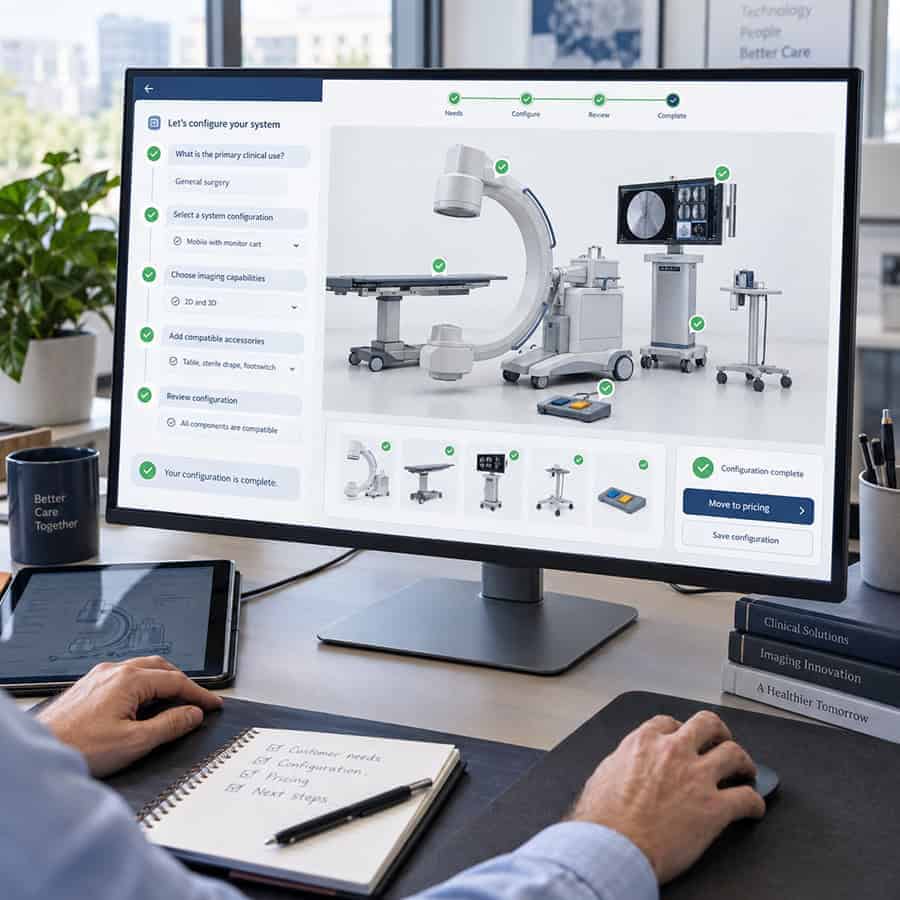
These are all things that can be configured in rules. The user can then log into your application and start configuring what they need. They select the base unit then other options open. The more selections they make the more options are exposed or excluded, leading them to a valid configuration.
Many configuration applications work this way, and they can be beneficial for the sales or engineering staff who already know their products. Some of the clients may be technical enough to make good use of the application, but for others, they need something more.
“As a client I want to configure a heart-lung machine. I want to be able to have XX throughput and run off YY power. I need to monitor AA, BB, and CC. I don’t want to be bothered with DD.”
The client doesn’t know the difference between the component represented by six different SKUs in your product list. Sure, they can see the specifications that are different but that doesn’t mean they understand the effects down the line. They just know what they need the THING to do.
Flipping the process upside down with AI enhancement
Instead of the client trying to select the components, the user uses natural language to tell the application what they need the Thing to do.
The app then uses an AI model trained on the products, their relationships, and their use cases to suggest a solution. This is not just the product details and rules but also descriptions of what something does.
This gives the AI the context to help it understand the uses, and then it can filter through the myriads of options to make suggestions. Since there are several directions the client may want to go, the AI can present a few options and ask questions about how the product will be used, which will guide it to a more refined solution.
The client can still select individual components if they wish, but a lot of the mystery has been removed because they can now feel confident that what is being configured is based on what they need and will meet their desired outcomes.
Configuring a connected system
Now that we can easily configure a piece of equipment to our specifications, we need to consider it in context. The next level of a configuration application is allowing the client to conceptually configure an interconnected system.
In manufacturing equipment, there are multiple machines connected, each playing a part in the process. Some are controlling, some are observing, some are doing mechanical work, etc.
Each of those machines need their own individual configuration, but then we need a way to connect them together and make sure we aren’t missing anything. A visual configurator can allow the user to draw out connections between pieces of equipment, connecting cables and hoses. This allows the system to verify that all connections are made and that they are valid. You won’t be able to connect a hose if the psi rating doesn’t meet the requirements for the port you are connecting to.
In many cases, the client may not have to do most of the connections themselves since an AI can be trained on what are the basic connections required and can already include them. The client can the alter them and try out different configurations with feedback about how the decisions change the overall KPIs.

Spatial planning for complex use cases
Most clients are purchasing equipment to fit into an existing space. The two configurators above only configured what the equipment could do and how they would work together.
In the case of a manufacturing line, figuring where this equipment will go, is just as important. By now we are all familiar with 3D representations of spaces. Even home floorplans can be viewed and rotated on basic devices to aid in furniture placement.
When configuring equipment in a space, we need intelligence built into the planning tool to help guide the user. Each piece of equipment must have a certain amount of free space on each side, they have temperature ranges they can operate in, you want to check that the height doesn’t clash with any overhanging equipment. Can venting be routed safely? Does the selected pump provide enough pressure to reach the next device or do we need to move it closer? These are things that might only be caught in an AutoCAD drawing by a human review who happened to know the details of the equipment.
Instead, we build the rules into the objects and let the application warn us of any issues. The AI tool can then make suggestions as needed.

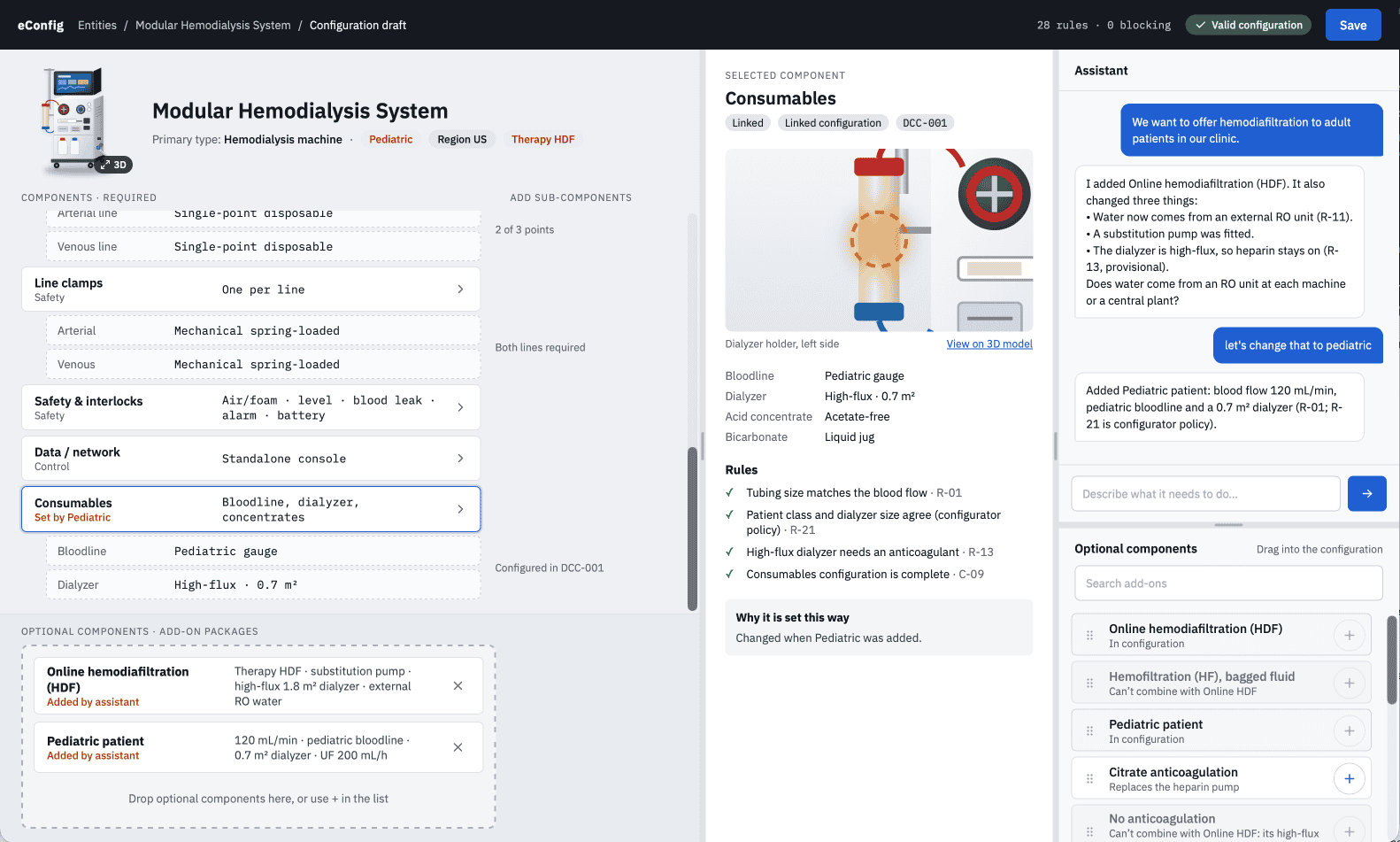
An example of an AI-enabled product configurator for a medical device manufacturer.
Configuration everywhere
Having worked on projects across medical device manufacturing, industrial manufacturing equipment, and offshore oil and gas platforms, I have seen the need for more intelligent configuration everywhere.
With data, rules, and validations in place, configuration becomes quick and reliable, drastically reducing the sales cycle by cutting down on the back-and-forth approval processes and engineering checks. Adding AI to these applications puts the client in control and gives them confidence in their choices that creates a stickiness and appreciation for what you do for them.